Anki for Dance Moves. Built Over 2 Pints.
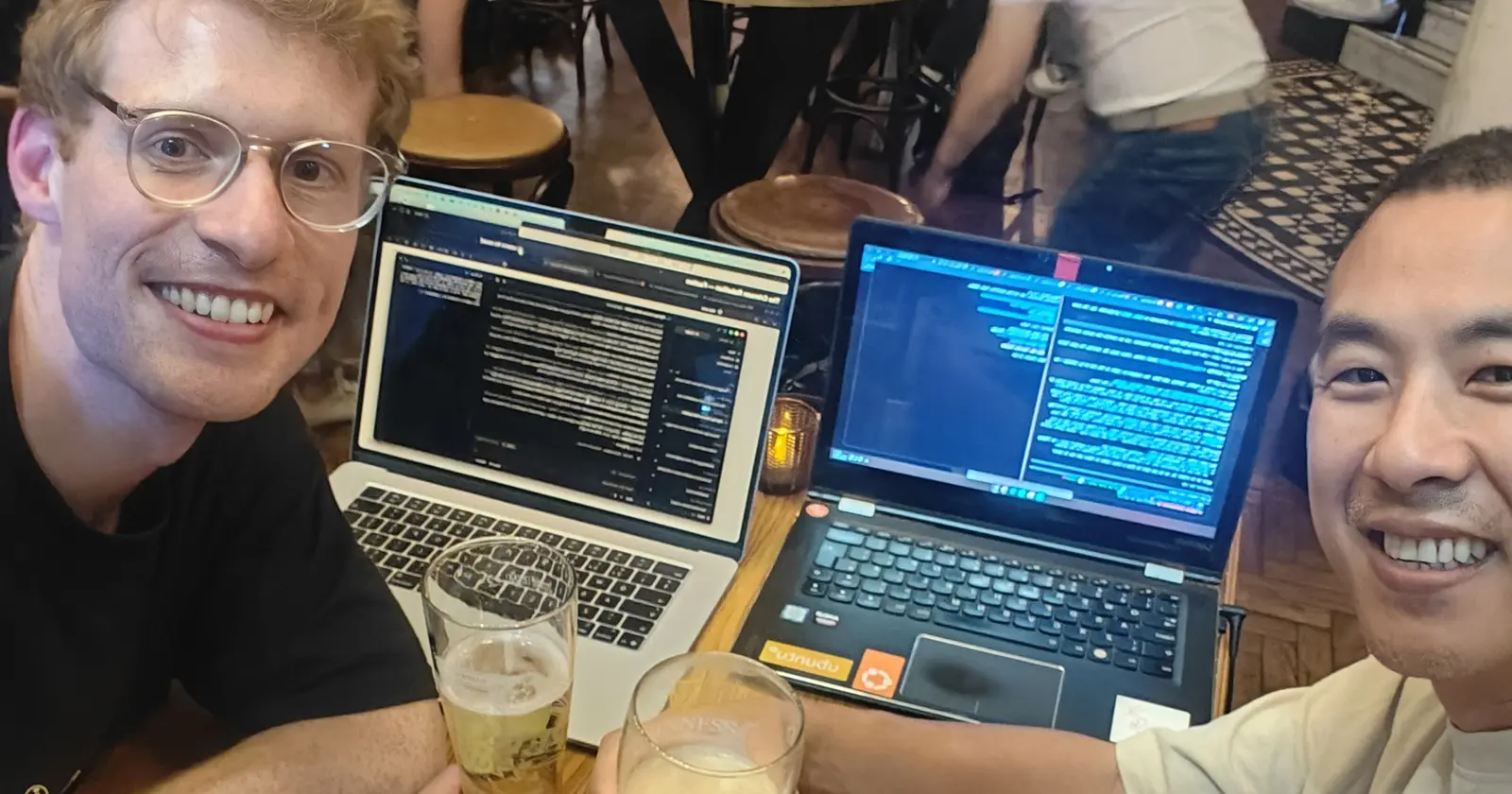
Matt and I met up earlier this week to do a Claude Code playground session. The Barrowboy & Banker by London Bridge, couple of pints, no agenda.
We are both into dancing. We met at a Not Just Hip Hop course, and then it turned out Matt works in tech.
First pint in, Matt starts telling me about Anki cards.
If you have not come across them, Anki is a flashcard app built on spaced repetition. It shows you a thing again right before you are about to forget it. Get it right, the gap gets longer. Get it wrong, it comes back in a minute.
Matt’s problem was that he could not remember the names of the moves from class. Neither could I. I struggle to force memorise names in the conventional way. You film the class, you go home, and three days later you are scrubbing through 40 minutes of footage looking for the bit where the teacher does the thing with the footwork shuffling and timing.
So we threw ideas around. Loads of them. Some were rubbish. Some was overengineering. But eventually we got it down to three lines:
- It has to be video based.
- You tag the bit of the video where the move happens, and you can replay just that bit.
- Wrap the whole thing in an Anki-style framework.
The rules we made up over the second pint
30 minutes to build the first version and demo it. Then 15 minutes each of tweaking, twice. One hour of build time total. (We added this 15mins tweaking because we wanted to make improvements!)
Same three criteria, but we each wrote our own brief in our own way. No looking at each other’s screen. Then compare.
That last part is the rare bit. Two people, same problem, same hour, and you see exactly where two brains diverge.
The brief was one message
Here is what I typed at 20:22:15 on Wednesday 19 August. All of it. One message.
new playground idea with my friend matt we just building something for fun. we both got same brief but wrote it in our own ways.
Anki card mini project for dance moves.
Someone wants to learn the hip hop moves but struggle to remember them and how they look like and work.
Hip Hop steps moves learnin how to remember.
user can upload a dance video from class which contains multiple moves. we’re thinking of an idea to tag be able to select timeframes within the video, and tag it with the name of the move.
this tag can then be searchable manually which shows all the videos that contains that tag, and upon clicking it, it will play the start time and stop at the end time of the move. it also lists the other tags within the video once open, so user can hit the move button and it will automatically change timestamp to where that move starts and ends.
we then want to turn this simple idea into an anki. please research how anki card works for learning, and we want to create a similar idea and framework but for dance videos uploaded by user to learn dance moves.
make this a local app that i can access and control via web browser. keep it simple stupid. what would be best coding language for this? typescript? rust? go? python? react? others! please quick research. We have 30ins from start to end of this mini fun project. so even if we run /Leader 1-5, we need to do it quickly and not the depth we used to. you may need to break up to more subagents in the workflow instead to make it work faster in parallel. this is a time constraint, we need to finish in 30mins.
no need for new repo, create a subfolder and that’s where you’ll create this fun project.
Typos and all. That is genuinely how I write to it.
Everything after it reacts to something already on screen, and roughly a quarter of my prompts carry no instruction at all. “yes”. “sorry continue”. Here is the whole log, times in BST, pulled out of the session transcript rather than reconstructed from memory:
| Time | What I typed |
|---|---|
| 20:22:15 | the brief above |
| 20:40:20 | “sorry continue” |
| 20:41:24 | “where we got to? I mistakenly hit stop” |
| 20:43:07 | “yes commit and push” |
| 20:48:05 | “every time i add a move in, can it set the SET IN to be the SET OUT timer, so i dont need to keep clicking it?” |
| 21:00:56 | “Can we have a collapse and categorised when we have same move in mutiple videos… the anki should randomise which one of the same move to use if multiple videos.” |
| 21:18:42 | “commit and push. all good? because later i want to go on my main computer and turn all of this into a blog” |
| 21:19:55 | “yes” |
| ~21:21 | “oh, also, where does the video reside when i upload” |
| ~21:31 | “i borrowed the video speed idea from matt, his version had that. ours didn’t document that.” |
| 21:35:54 | “i thihnk we should add 2x speed and 3x speed and 5x speed…” |
| 21:36:36 | “i thihnk we should add 1.5x speed and 3x speed and 6x speed…” |
| 21:38:19 | “for our blog, can you write all my original prompts to you and timestamp time” |
Look at 21:35:54 and 21:36:36. I changed my mind 42 seconds later. I left both in, because prompt logs always get shown as though every request arrived perfectly formed, and mine really really don’t.
18 minutes 33 seconds
That is brief to working app. 20:22:15 to 20:40:48.
I had remembered it as 20 minutes. The transcript says 18 minutes 33 seconds, so past-me was being modest for once. The photo of the two of us clinking glasses was taken at 20:42:15, which is 87 seconds after it came up.
Three minutes later, at 20:43:52, my first real class video had finished uploading and I was tagging moves in it. It ran for 7 minutes 17 seconds of actual use before I asked for a single change. Inside the 30-minute budget with about 11 minutes to spare.
And that was the whole brief, not a skeleton. Tagging, cross-video search, click a result and it plays that clip only and stops dead on the out-point, the jump strip, and the full Anki review mode.
Matt’s brief, and why it went differently
Here is Matt’s opening prompt. Same problem, same pub, same night.
this is a brand new project, use uv to create a venv. we’ll be using python when necessary.
I like going to hip hop dance classes, where we practice choreos, but I struggle to remember the moves afterwards. I’m thinking of a system to fix this. I usually record a video of the choreo at each class. I imagine uploading this video after the class; it should then be segemented into the different named hip hop moves; each move is stored as a separate ‘anki card’ and then we use the anki spaced repetition system to make sure I remember the name and what it represents afterwards. We want to automate this as much as possible, but some human assisted tagging might be necessary. Help me to flesh out how the system will work.. tech stack is python, plus a simple html website as the front end for the moment. We could also just build a card creation system that we then feed into anki.. maybe that’s the thing to focus on first.
Does this make sense?
They are not the same shape at all.
Matt picked his stack in the first eight words. Python, a venv, simple HTML. I did the opposite and asked out loud: typescript? rust? go? python? react? I did not know, so I made it go and find out. It probed the box, found no Go and no FastAPI installed, and came back with standard library only. Which killed the whole install and build step, in a pub, on pub wifi.
He also wanted the video automatically segmented into named moves, a far more ambitious ask than mine. I specified manual tagging, because I knew I would be scrubbing through it myself.
And then the two endings. Mine finishes with a deadline and an instruction on how to split the work up in parallel. His finishes with “Help me to flesh out how the system will work” and “Does this make sense?”
That is the whole thing, right there.
Matt opened a design conversation, so he got a design conversation. He was building it MVP piece by piece and adding features on after, which is a completely legitimate way to work and honestly it is how most people are taught to work. I gave the full idea and the full briefing in the first prompt, and everything after it was a tweak.
He also ran out of time before the Anki part. His app is literally subtitled “CHOREO to ANKI”, so it was never that he did not want it. He spent his hour on the tagging side and the clock beat him.
What the numbers do not show
Now hold on. Before anyone runs off with “the harness makes you 3x faster”, let me kill that one.
This was not a controlled experiment. Two blokes, two pints, two laptops, no stopwatch. One data point from a pub.
And a fair chunk of that hour was just us talking. There were stretches where Matt’s Claude Code had finished and was sat there waiting on his next prompt, and he had not clocked it because we were mid-conversation with a pint in hand. Dead time that needed his attention and did not get it. None of that is about the tooling.
The harness cost me time here too. Two research agents went out at the brief, and the one researching the stack stalled and returned absolutely nothing, which did not surface until about 10 minutes in. The build carried on in parallel, so it cost a wasted dispatch rather than wall clock. But an unharnessed run would never have made that dispatch at all.
What my SST3-AI-Harness actually bought me is that I did not have to type the standards out. The workflow, the quality bar, commit per file. Already sat there in the repo, so it just applied. A real advantage, and a much more modest one than “faster”.
The tweaks, and this is where Matt got competitive
First tweak was tagging friction. Marking IN then OUT for every move meant two clicks per move, forever. So now the OUT you just saved becomes the next move’s IN. Hit i once at the start, then just o at the end of each move, type the name, Enter. Second was collapsing repeat moves into a single row.
Then Matt’s version showed me slow motion. His had 0.25x and 0.5x from the start, mine had nothing at all, so I nicked it. Fair is fair. It is sticky too, so a move you keep failing can sit at quarter speed and follow you into review without resetting every card.
Then I wanted the other end, because a 40-minute class recording is mostly not the bit you want. 1.5x, 3x and 6x for scanning. Browsers mute audio above roughly 4x, so 6x is a visual skim only.
Two apps, side by side
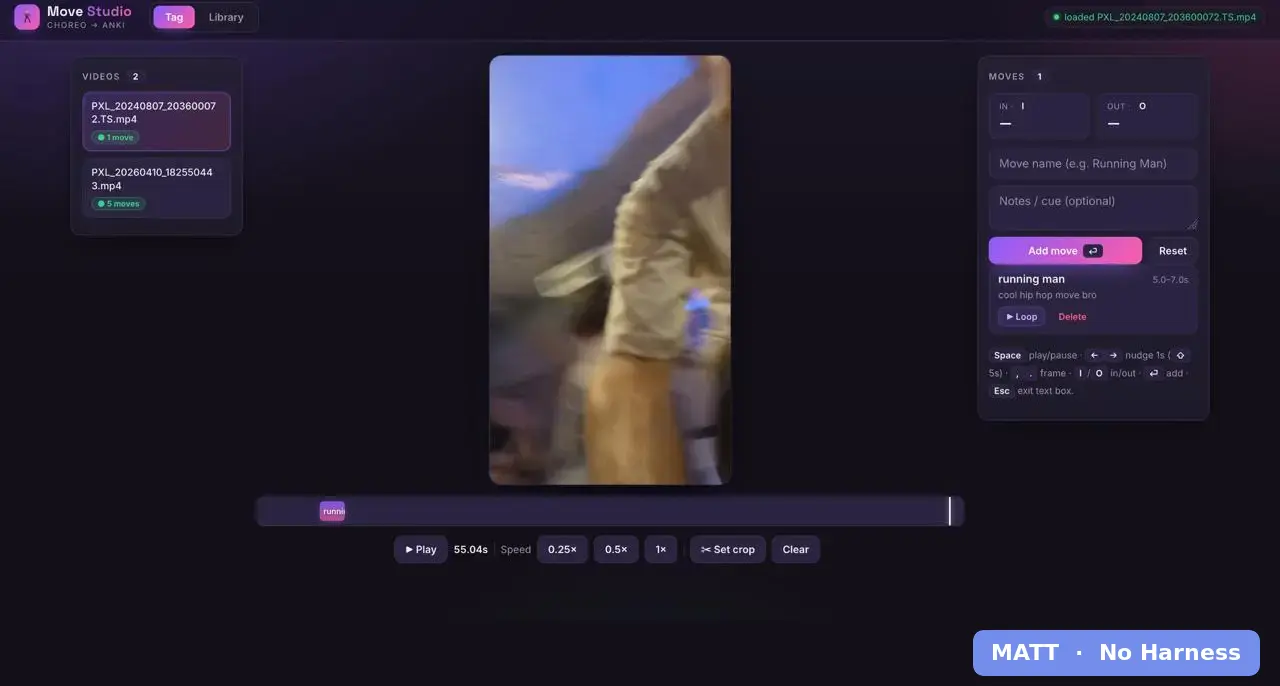
His is called Move Studio, and I will say it out loud, it looks better than mine. A proper timeline strip under the video with the tagged region drawn onto it, frame-by-frame nudge on the comma and full stop keys, a crop tool, a loop button on every tag. Mine has none of that.
Mind you, that is after over-over-time. He carried on way, way past the hour we agreed, and cheekily prompted Claude Code to improve the UI because it was like barebone! Hahaha. He got competitive. I love it.
But look at his library, then look at mine, because this is the bit that made me sit up.
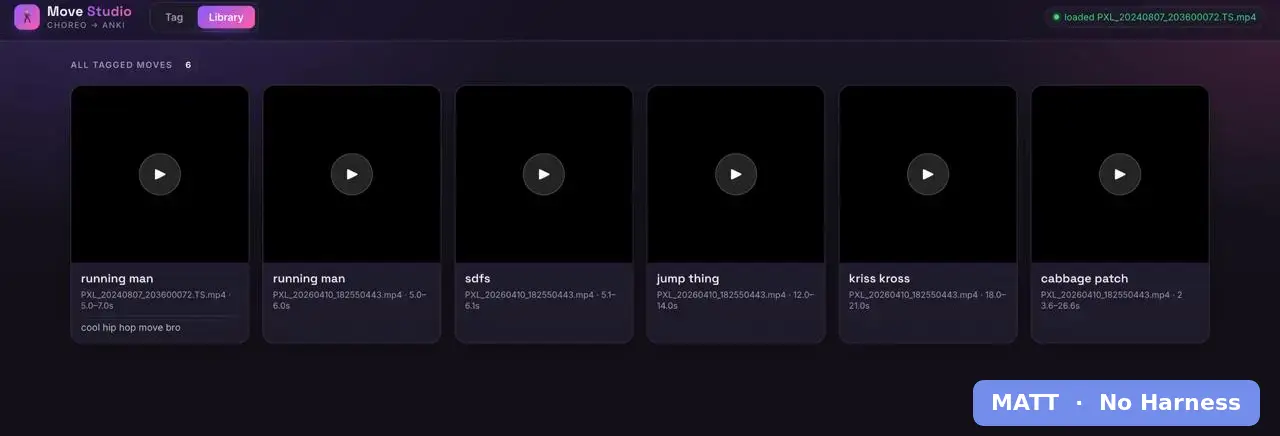
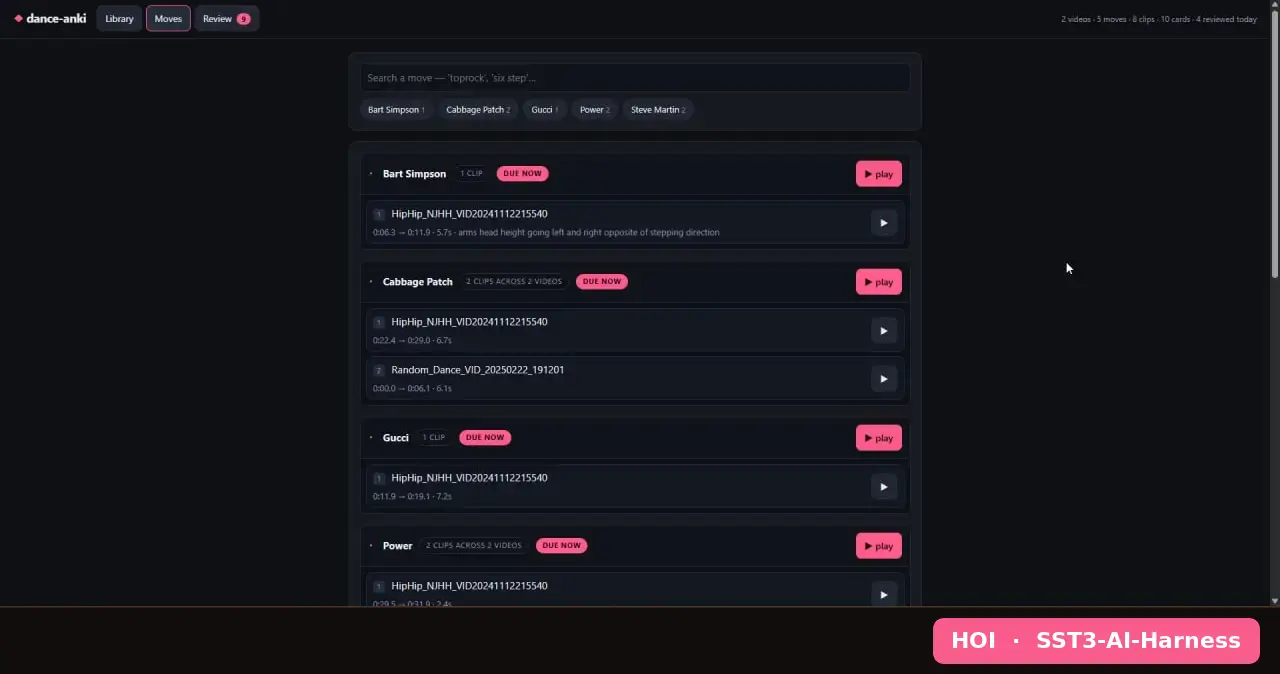
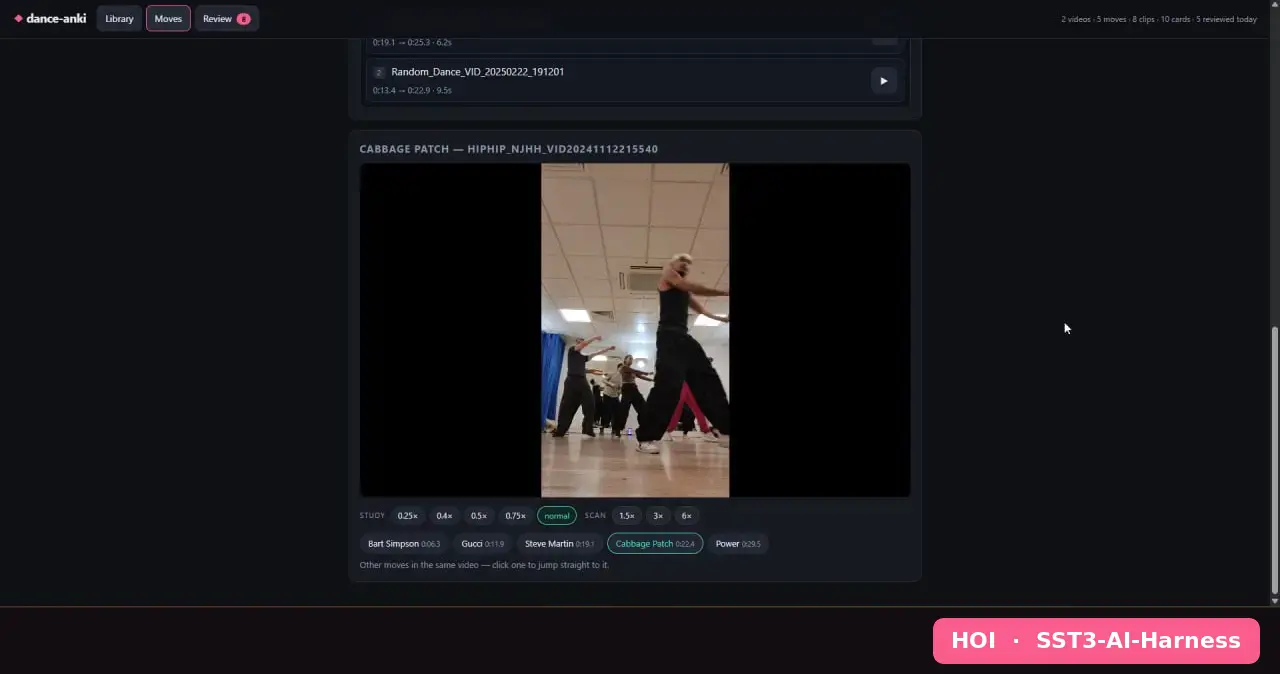
His library has “running man” in it twice. Two cards, because he tagged it in two different videos. Mine has one row that says “Cabbage Patch, 2 clips across 2 videos”, and it will still be one row when there are ten.
Same night, same problem, and we landed on opposite sides of one design decision without ever discussing it. His is a card per clip. Mine is a card per move.
The Anki bit, and how it actually works
This is my favourite part, and I had honestly forgotten how it was built until I went back and read the code.
Anki’s core trick is that one fact can generate more than one card. A note goes in, and card templates turn it into several cards that get scheduled separately. The classic is “Basic (and reversed)”, front to back and back to front.
So here, one move gives you two cards.
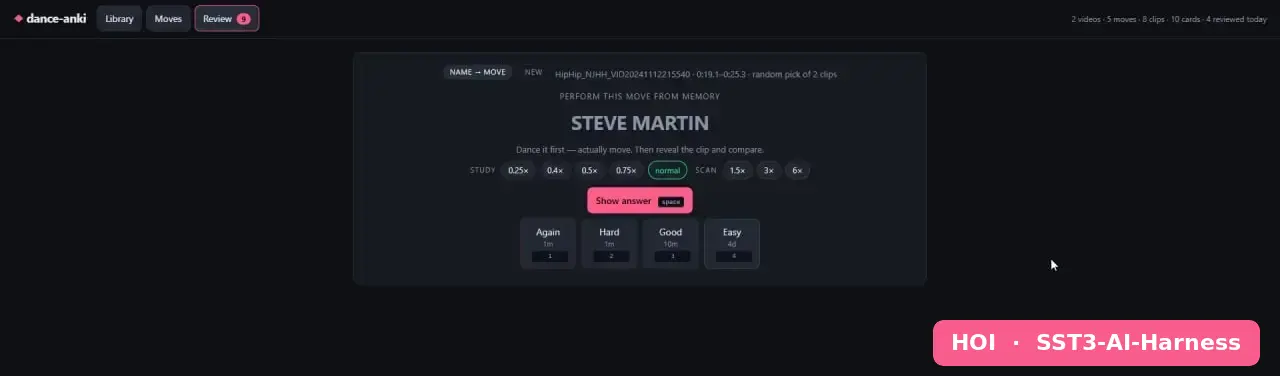
recall shows you the name. Nothing else. Mine literally says “PERFORM THIS MOVE FROM MEMORY”, then underneath, “Dance it first, actually move. Then reveal the clip and compare.” So you do it, then the clip plays, and you grade how your body did rather than how your memory did.
recognise flips it. “WHAT MOVE IS THIS?” over an unlabelled clip, and you have to name it. That is the “what on earth is that thing the teacher just did” card, and it is the one Matt and I both needed.
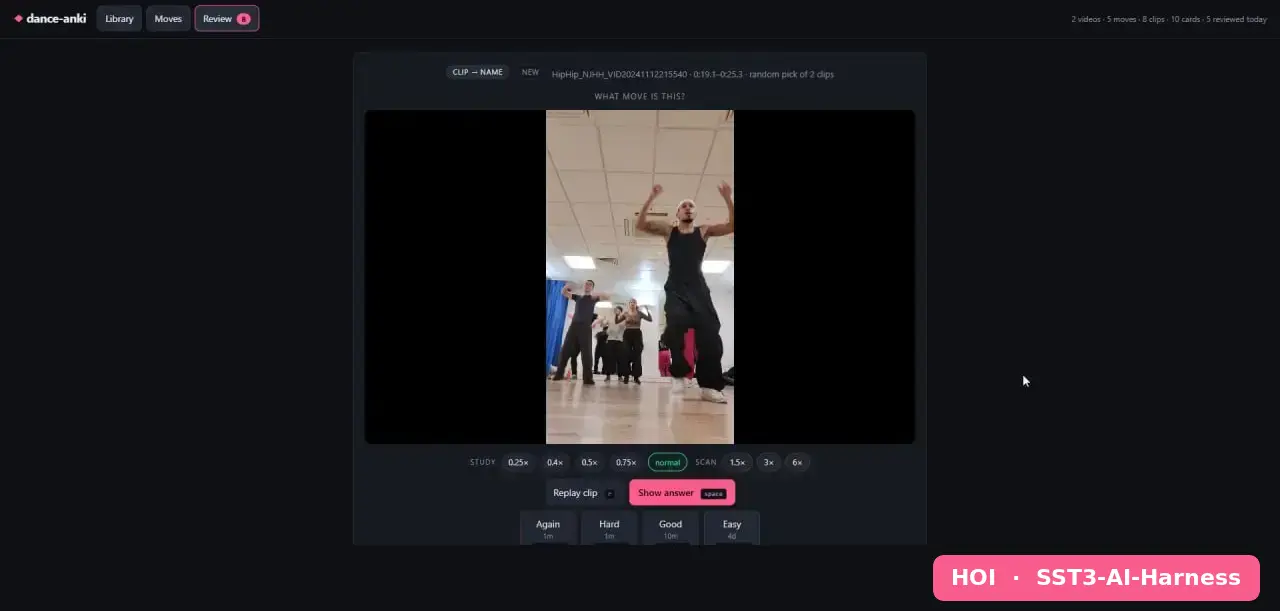
And here is where the card-per-move decision pays off, which came out of my 21:00:56 prompt asking for randomisation rather than any grand plan.
The move is the note. Not the clip.
Six takes of one move is still two cards, not twelve. Six exemplars, and one gets drawn at random when the card comes up. Different class, different room, different teacher, different angle, every time.
There is real learning theory behind that, called variability of practice. A move you only ever saw from one camera angle gets memorised as that angle. Seeing it from a different one each time trains the move itself. It also keeps the deck honest: your drill load is the number of moves you are learning, not the number of times you pressed record.
Underneath it is SM-2 on Anki’s shipped defaults. 1 and 10 minute learning steps, graduates at 1 day, leech flag after 8 lapses. About 130 lines of Python, zero dependencies.
And the honest caveat, because I am not going to pretend otherwise. Spaced repetition was designed for declarative memory. Facts. Words. Capital cities. Dance is procedural memory, which lives in the body and needs real physical repetition. Self-rating “yeah I remember that one” is not the same as being able to do it. Which is exactly why the recall card makes you perform it first. Treat the scheduler as what decides what to revisit and when, and your own body as the grader.
Part of the early debates with Matt during the first pint was basically me saying the normal memorisation methods doesn’t work for me. What would be better is a dance Anki that does emotional and physical and mental association, for it to stick in our memory and to remember and recall. So I was quite chuffed with the outcome implementation, as it hits those pointers. Different music video can trigger different emotions, the physical practice on some of the recall, and the mental from the visual recognise.
So, what now?
It is a cool little thing to have come out of just over an hour in a pub.
I am thinking about porting this simple dance Anki app over to my dancesimple.org project and making it free to use. A free tool that helps people actually remember what they learned in class fits that perfectly.
The thing I have not solved is hosting. Compute is almost nothing here, it is a standard-library server and a SQLite file. Storage and egress are the cost, and user-uploaded class video is about the worst possible shape for a free tier. Hundreds of megabytes per file, streamed over and over, served in chunks. Egress fees on that get expensive fast. £££. We can always sell the data to AI as datasets for AI training, with the videos and tagging done already haha. But yeah, gotta think about that one!
There are ways around it. Cloudflare R2 charges nothing for egress, which is what makes it survivable at all. Or you do not host the video at all, and the app just tags footage people already have, storing timestamps and move names. Storage problem gone, offline use and private class footage get harder.
So I am still weighing it up. It might happen, it might not, or it might be a “once the dance business is properly off the ground” thing. Watch this space.
What I do want to be clear about: the Anki idea was Matt’s, and so was combining it for dance. He brought it to the table, I threw a few ideas in on top. Give credit where it is due.
Team work bro! :D